AzurTian的博客
Mybatis学习
目录
1、环境搭建
1.1、搭建数据库
CREATE DATABASE `mybatis`;
USE `mybatis`;
CREATE TABLE `user`(
 `id` INT(20) PRIMARY KEY,
 `name` VARCHAR(30) DEFAULT NULL,
 `pwd` VARCHAR(30) DEFAULT NULL
);
INSERT INTO `user` VALUES
(1,"tom","123456"),
(2,"jack","123456"),
(3,"tim","123456");
1.2、导入依赖
<dependency>
            <groupId>mysql</groupId>
            <artifactId>mysql-connector-java</artifactId>
            <version>8.0.25</version>
        </dependency>
        <dependency>
            <groupId>org.mybatis</groupId>
            <artifactId>mybatis</artifactId>
            <version>3.5.6</version>
</dependency>
1.3、编写DAO接口
还要编写pojo层具体实体类
public interface UserDao {
    List<User> getUserList();
}
1.4、编写mybatis工具类
public class MybaisUtils {
    private static SqlSessionFactory sqlSessionFactory;
    static {
        try {
            String resource = "mybatis.xml";
            InputStream inputStream = Resources.getResourceAsStream(resource);
            sqlSessionFactory = new SqlSessionFactoryBuilder().build(inputStream);
        } catch (IOException e) {
            e.printStackTrace();
        }
    }
    public static SqlSession getSqlSession(){
        return sqlSessionFactory.openSession();
    }
}
1.5、编写配置文件
<?xml version="1.0" encoding="UTF-8" ?>
<!DOCTYPE configuration
PUBLIC "-//mybatis.org//DTD Config 3.0//EN"
"http://mybatis.org/dtd/mybatis-3-config.dtd">
<configuration>
<environments default="development">
<environment id="development">
<transactionManager type="JDBC"/>
<dataSource type="POOLED">
<property name="driver" value="com.mysql.cj.jdbc.Driver"/>
<property name="url" value="jdbc:mysql://localhost:3306/mybatis?useSSL=true&useUnicode=true&characterEncoding=UTF-8&serverTimeZone=UTC"/>
<property name="username" value="root"/>
<property name="password" value="Tmh010625"/>
</dataSource>
</environment>
</environments>
<mappers>
<mapper resource="UserMapper.xml"/>
</mappers>
</configuration>1.5.1、外部链接配置方法
在configuration标签内第一行写明properties标签
<properties resource="db.properties"/>
    <environments default="development">
        <environment id="development">
            <transactionManager type="JDBC"/>
            <dataSource type="POOLED">
                <property name="driver" value="${db.driver}"/>
                <property name="url" value="${db.url}"/>
                <property name="username" value="${db.username}"/>
                <property name="password" value="${db.password}"/>
            </dataSource>
        </environment>
</environments>
1.5.2、配置properties文件
db.driver=com.mysql.cj.jdbc.Driver
db.url=jdbc:mysql://localhost:3306/mybatis?useSSL=true&useUnicode=true&characterEncoding=UTF-8&serverTimeZone=UTC
db.username=root
db.password=Tmh010625
1.6、编写SQL映射xml文件
<?xml version="1.0" encoding="UTF-8" ?>
<!DOCTYPE mapper
        PUBLIC "-//mybatis.org//DTD Mapper 3.0//EN"
        "http://mybatis.org/dtd/mybatis-3-mapper.dtd">
<mapper namespace="org.learn.demon.dao.UserDao">
    <select id="getUserList" resultType="org.learn.demon.pojo.User">
        select * from mybatis.user
    </select>
</mapper>
1.7、MAVEN额外配置
约定大于配置,在resources文件夹外编写xml文件或其他文件时,配置pom.xml
<build>
        <resources>
            <resource>
                <directory>src/main/resources</directory>
                <includes>
                    <include>**/*.properties</include>
                    <include>**/*.xml</include>
                </includes>
                <filtering>false</filtering>
            </resource>
            <resource>
                <directory>src/main/java</directory>
                <includes>
                    <include>**/*.properties</include>
                    <include>**/*.xml</include>
                </includes>
                <filtering>false</filtering>
            </resource>
        </resources>
</build>
2、CRUD
2.1、namespace
namespace中的包名要和Dao/mapper接口的包名一致!
2.2、select
语法:
增删改方法中必须提交事务才能执行
SqlSession sqlSession = MybaisUtils.getSqlSession();
sqlSession.commit();
- id:就是对应的namespace中的方法名
- resultType:Sql语句执行的返回值
- parameterType:参数类型
2.2.1、在接口中写方法
//查询全部用户
List<User> getUserList();
2.2.2、在mapper.xml映射文件中编写sql语句
<select id="getUserList" resultType="org.learn.demon.pojo.User">
        select * from mybatis.user
</select>
2.2.3、编写测试方法
@Test
public void test1(){
    SqlSession sqlSession = MybaisUtils.getSqlSession();
    UserMapper mapper = sqlSession.getMapper(UserMapper.class);
    List<User> userList = mapper.getUserList();
    for(User user:userList){
        System.out.println(user);
    }
    sqlSession.close();
}
2.3、insert
2.3.1、在接口中写方法
//insert一个用户
int addUser(User user);
2.3.2、在mapper.xml映射文件中编写sql语句
<insert id="addUser" parameterType="org.learn.demon.pojo.User">
        insert into mybatis.user (id, name, pwd) values (#{id},#{name},#{pwd});
</insert>
2.3.3、编写测试方法
@Test
public void test3(){
    SqlSession sqlSession = MybaisUtils.getSqlSession();
    UserMapper mapper = sqlSession.getMapper(UserMapper.class);
    mapper.addUser(new User(4, "哈哈", "123123"));
    sqlSession.commit();
    sqlSession.close();
}
2.4、update
<update id="updateUser" parameterType="org.learn.demon.pojo.User">
        update mybatis.user set name=#{name},pwd=#{pwd} where id = #{id};
</update>
2.5、delete
<delete id="deleteUser" parameterType="int">
        delete from mybatis.user where id = #{id};
</delete>
2.6、万能map
Map传递参数,在sql中取出key
对象传递参数,在sql中取出对象的属性
只有一个基本类型参数,直接在sql中取出
2.7、模糊查询
java代码执行的时候,传递通配符%%
List<User> userList = mapper.getUserLike("%李%");在sql拼接中使用通配符
select * from mybatis.user where name like "%"#{value}"%";
3、配置解析
3.1、类型别名(typeAliases)
类型别名是为java类型设置一个短的名字
用来减少完全限定名的冗余
- 在mybatis配置xml文件中配置
3.1.1、别名(typeAlias)
<typeAliases>
        <typeAlias type="org.learn.demon.pojo.User" alias="user"/>
</typeAliases>
可以用user来代替org.learn.demon.pojo.User的书写
3.1.2、扫描包(package)
<typeAliases>
        <package name="org.learn.demon.pojo"/>
</typeAliases>
mybatis在包名下面搜索需要的java bean
扫描实体类的包,默认别名为这个类的类名,首字母小写
第二种添加别名则需要在实体类上配置注解
@Alias(value = "hello")
public class User {}
4、解决属性名和字段名不一致的问题
4.1、在查询语句中起别名,别名与属性名一致(as)
4.2、xml文件中使用resultMap
java实体类属性为password,数据库中字段名为pwd
<resultMap id="userMap" type="org.learn.demon.pojo.User">
        <result column="pwd" property="password"/>
    </resultMap>
    <select id="selectOneUser" resultMap="userMap" parameterType="int">
        select * from mybatis.user where id = #{id};
</select>
5、日志

mybatis配置xml文件,使用settings标签选择生成日志功能,常见的日志有以下几种:
- SLF4J ***
- LOG4J ***
- LOG4J2
- JDK_LOGGING
- COMMONS_LOGGING
- STDOUT_LOGGING ***
- NO_LOGGING
<settings>
        <setting name="logImpl" value="STDOUT_LOGGING"/>
</settings>
5.1、log4j
创建log4j的properties文件,配置如下内容
#将等级为DEBUG的日志信息输出到console file这两个目的地,console file的定义在下面的代码
1og4j.rootLogger=DEBUG,console,file
#控制台输出的相关设置
1og4j.appender.console=org.apache.1og4j.ConsoleAppender
1og4j.appender.console.Target=System.out
1og4j.appender.console.Threshold=DEBUG
1og4j.appender.console.1ayout=org.apache.1og4j.PatternLayout
1og4j.appender.console.layout.ConversionPattern=[%c]-%m%n
#文件输出的相关设置
1og4j.appender.file=org.apache.1og4j.RollingFlAppedr
1og4j.appender.file.File=./1og/kuang.log
1og4j.appender.file.MaxFileSize=10mb
1og4j.appender.file.Threshold=DEBUG
1og4j.appender.file.layout=org.apache.log4j.PatternLayout
1og4j.appender.filelayout.ConversionPattern=[%p][%d{yy-M-dd}][%c]%m%n
#日志输出级别
1og4j.logger.org.mybatis=DEBUG
1og4j.logger.java.sq1=DEBUG
1og4j.logger.java.sq1.Statement=DEBUG
1og4j.1ogger.java.sq1.ResultSet=DEBUG
log4j.logger.java.sq1.Preparedstatement=DEBUG
6、使用注解开发(不建议)
本质是反射,底层是动态代理
6.1、注解在接口上实现
@select("select * from user")
List<User> getUser();
6.2、核心配置文件中绑定接口
<mapper>
	<mapper class="org.learn.demon.dao.UserMapper"/>
</mapper>
6.3、@Param()注解
- 基本类型的参数或者String类型,需要加上
- 引用类型不需要加
- 如果只有一个基本类型可以忽略,建议都写上
- 在SQL中引用的就是我们这里的@Param()中设定的属性名
7、多表关联查询
建议使用联表查询
- 创建数据库
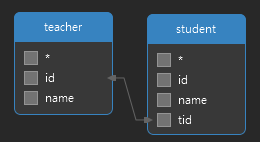
7.1、多对一
JAVA中表示为类中的属性含有对象
创建实体类
@Data
public class Student {
    private int id;
    private String name;
    private Teacher teacher;
}
@Data public class Teacher { private int id; private String name; }
7.1.1、子查询
<select id="getAllStudentInfo" resultMap="studentMap">
        select * from mybatis.student;
    </select>
    <resultMap id="studentMap" type="Student">
        <result property="id" column="id"/>
        <result property="name" column="name"/>
        <association property="teacher" column="tid" javaType="Teacher" select="getAllTeacher"/>
    </resultMap>
    <select id="getAllTeacher" resultType="Teacher">
        select * from mybatis.teacher;
</select>
7.1.2、联表查询
<select id="getAllStudentInfo2" resultMap="stuTeaMap">
        select s.id as sid,s.name as sname,t.name as tname,t.id as tid from mybatis.student as s,mybatis.teacher as t where s.tid = t.id;
    </select>
    <resultMap id="stuTeaMap" type="Student">
        <result property="id" column="sid"/>
        <result property="name" column="sname"/>
        <association property="teacher" column="Teacher">
            <result property="name" column="tname"/>
            <result property="id" column="tid"/>
        </association>
</resultMap>
7.2、一对多
JAVA中表示为类中的属性含有集合对象
创建实体类
@Data
public class Student{
    private Integer id;
    private String name;
    private Integer tid;
}
@Data public class Teacher{ private Integer id; private String name; private List<Student> students; }
7.2.1、联表查询
<select id="selectTeacherById" resultMap="getStudentMap" parameterType="int">
        select t.id as tid,t.name as tname,s.name as sname,s.id as sid,s.tid as stid from mybatis.teacher as t,mybatis.student as s
        where t.id = s.tid and t.id = #{tid};
    </select>
    <resultMap id="getStudentMap" type="Teacher">
        <result column="tname" property="name"/>
        <result column="tid" property="id"/>
        <collection property="students" ofType="Student">
            <result property="name" column="sname"/>
            <result property="id" column="sid"/>
            <result property="tid" column="tid"/>
        </collection>
</resultMap>
8、动态SQL
8.1、where/if
自动去除and添加and
<select id="selectBlogJudge" resultType="myBlog" parameterType="map">
        select * from mybatis.myblog
        <where>
            <if test="title != null">
                title = #{title}
            </if>
            <if test="author != null">
                and author = #{author}
            </if>
        </where>
</select>
8.2、set
自动去除逗号
<set>
    <if test="author != null">
        author = #{author},
    </if>
</set>
<where>
    id = #{id}
</where>
8.4、foreach
collection表示传入为集合元素
item表示传入的具体元素
open表示开头用什么
close表示结尾用什么
separator表示中间判断条件的连接符
<select id="selectBlogById" resultType="myBlog" parameterType="map">
    select * from mybatis.myblog
    <where>
        <foreach collection="names" item="author" open="and (" close=")" separator="or">
            author = #{author}
        </foreach>
    </where>
</select>
8.5、SQL
标签内的id可以被别的SQL语句用include语句引用,提高代码可重用性
<sql id="if-text-title">
    <if test="title != null">
        title = #{title}
    </if>
    <if test="author != null">
        and author = #{author}
    </if>
</sql>
<select id="selectBlogJudge" resultType="myBlog" parameterType="map">
    select * from mybatis.myblog
    <where>
        <include refid="if-text-title"></include>
    </where>
</select>
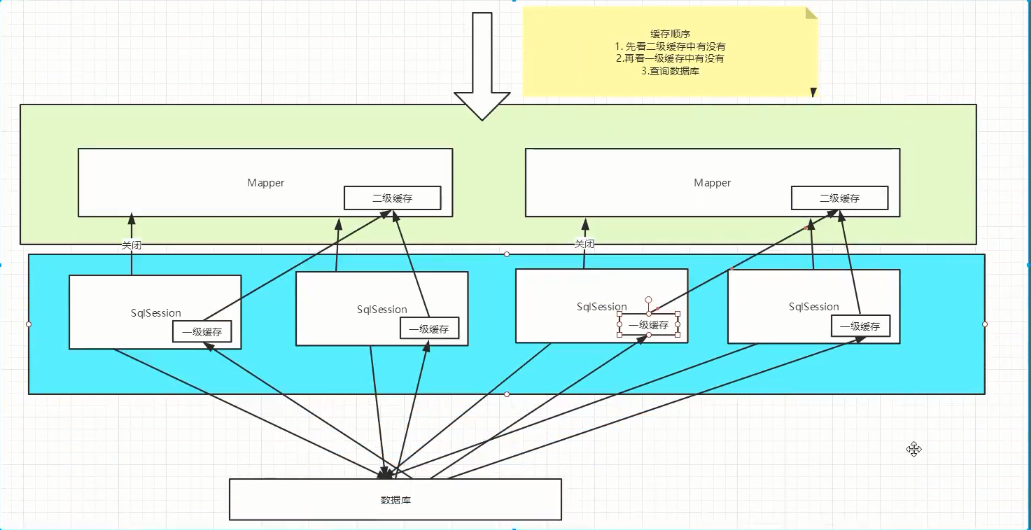
9、二级缓存
- 基于namespace级别缓存,一个名称空间对应一个二级缓存,也叫全局缓存
- 工作机制
- 一个会话查询一条数据,这个数据就会被放在当前会话的一级缓存中
- 如果当前会话关闭,对应的一级缓存清除
- 新的会话查询信息,可以从二级缓存中获取内容
- 不同的mapper查出的数据会放在自己对应的缓存(map)中